Response matrix (effective aperture)
For some workflows it is convenient to precompute the per-pixel
response of a telescope+camera pair as a function of stellar
position. Camera.response_matrix does this in a single render
pass: it traces all sources at once and scatters the resulting
rays into a (n_sources, n_sensors, *pixel_shape) array.
import jax
import jax.numpy as jnp
import matplotlib.pyplot as plt

from iactrace import Camera, Telescope
Load HESS CT3
We only load 1 sample per mirror to be fast enough to execute on CPU, but generally you should choose higher values.
telescope = Telescope.from_yaml(
    "../../configs/HESS/CT3.yaml",
    n_samples=1,
    key=jax.random.key(42),
)
telescope = telescope.apply_roughness(0, 24)

camera = Camera.from_yaml("../../configs/HESS/HESS1U.yaml")
E0804 11:11:46.499473 3123608 numa_hwloc.cc:121] Call to hwloc_set_cpubind() failed: Invalid argument [22]
E0804 11:11:46.499605 3123609 numa_hwloc.cc:121] Call to hwloc_set_cpubind() failed: Invalid argument [22]
E0804 11:11:46.499656 3123610 numa_hwloc.cc:121] Call to hwloc_set_cpubind() failed: Invalid argument [22]
Sample a grid of stellar directions
We tile a square in the field of view; each row of the response matrix will be the per-pixel response to a single direction.
fov_deg = 5.5
fov_rad = fov_deg * jnp.pi / 180

n_side = 128
x1d = jnp.linspace(-fov_rad / 2, fov_rad / 2, n_side)
y1d = jnp.linspace(-fov_rad / 2, fov_rad / 2, n_side)
X, Y = jnp.meshgrid(x1d, y1d, indexing="xy")
z = -jnp.ones(n_side**2)

sources = jnp.stack([X.ravel(), Y.ravel(), z], axis=1)
sources = sources / jnp.linalg.norm(sources, axis=1, keepdims=True)
Compute the response matrix
Output shape is (n_sources, n_sensors, n_pixels). CT3 has a
single hexagonal sensor group with 960 pixels.
rm = camera.response_matrix(
    telescope.render(sources, jnp.ones(sources.shape[0]), source_type="parallel"),
    sensor_idx=0,
)
rm.shape
(16384, 1, 960)
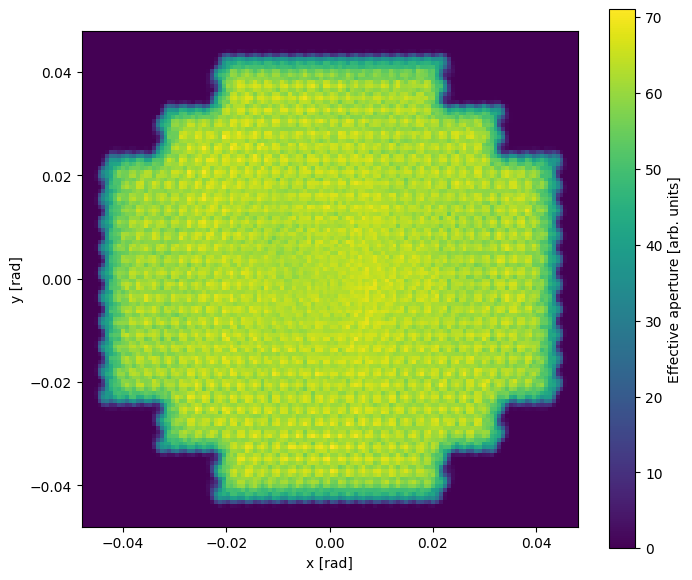
Total effective aperture per source
Sum across pixels and reshape onto the source grid:
weights = rm.sum(axis=(1, 2)).reshape(n_side, n_side)

fig, ax = plt.subplots(figsize=(8, 7))
im = ax.imshow(
    weights,
    origin="lower",
    extent=[x1d[0], x1d[-1], y1d[0], y1d[-1]],
)
fig.colorbar(im, ax=ax, label="Effective aperture [arb. units]")
ax.set_xlabel("x [rad]")
ax.set_ylabel("y [rad]")
Text(0, 0.5, 'y [rad]')
Per-pixel effective aperture
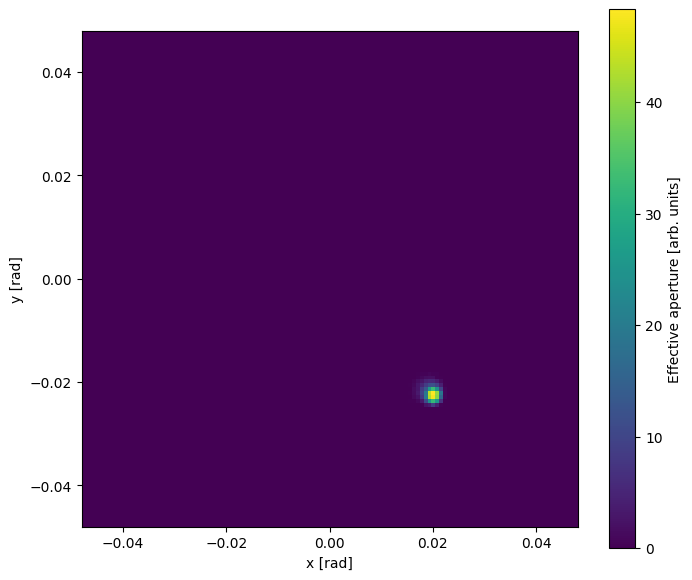
Pick a single pixel (e.g. pixel 300) and visualise where on the sky an incoming photon ends up in that pixel.
pixel_id = 300
weights_pix = rm[:, 0, pixel_id].reshape(n_side, n_side)

fig, ax = plt.subplots(figsize=(8, 7))
im = ax.imshow(
    weights_pix,
    origin="lower",
    extent=[x1d[0], x1d[-1], y1d[0], y1d[-1]],
)
fig.colorbar(im, ax=ax, label="Effective aperture [arb. units]")
ax.set_xlabel("x [rad]")
ax.set_ylabel("y [rad]")
Text(0, 0.5, 'y [rad]')
Re-rendering after misalignment
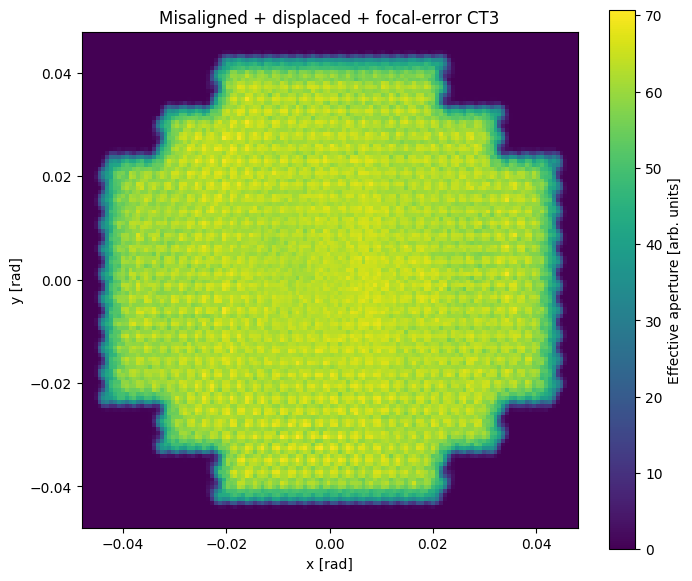
response_matrix is a thin wrapper around the regular render
path, so functional updates to the telescope (e.g. random
misalignment) compose naturally.
perturbed = (
    telescope.apply_misalignment(0, 15, 10, jax.random.key(0))
    .apply_displacement(0, 0.02, jax.random.key(1))
    .apply_focal_error(0, 0.07, jax.random.key(2))
)
rm_p = camera.response_matrix(
    perturbed.render(sources, jnp.ones(sources.shape[0]), source_type="parallel"),
    sensor_idx=0,
)
weights_p = rm_p.sum(axis=(1, 2)).reshape(n_side, n_side)

fig, ax = plt.subplots(figsize=(8, 7))
im = ax.imshow(
    weights_p,
    origin="lower",
    extent=[x1d[0], x1d[-1], y1d[0], y1d[-1]],
)
fig.colorbar(im, ax=ax, label="Effective aperture [arb. units]")
ax.set_title("Misaligned + displaced + focal-error CT3")
ax.set_xlabel("x [rad]")
ax.set_ylabel("y [rad]")
Text(0, 0.5, 'y [rad]')